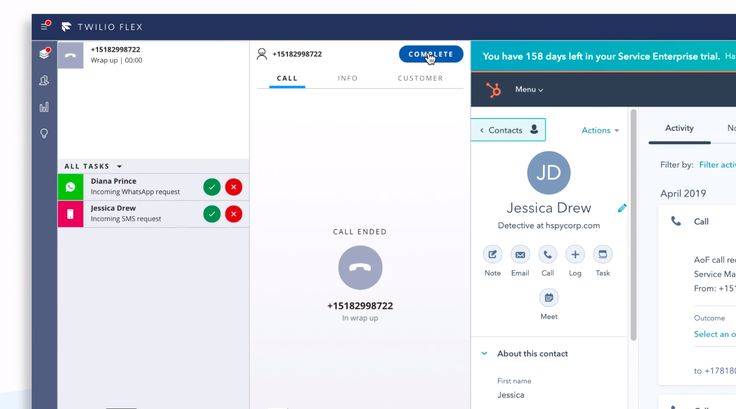
Twilio Flex is a programmable, cloud-based digital engagement center that lets you build a fully customized, omnichannel contact center across voice, SMS, WhatsApp, web chat, email, and social channels. This article explores practical Twilio Flex demo use cases so you can clearly showcase real-world omnichannel customer support in action and impress both technical and non-technical stakeholders.
What Is Twilio Flex And Why Use A Demo?
Twilio Flex is a cloud contact center platform that provides a single user interface and native channels to manage end-to-end customer interactions. Unlike traditional, fixed-function contact center software, Flex is fully programmable, meaning you can customize interfaces, routing logic, workflows, and integrations through APIs, SDKs, and low-code tools.
In a Twilio Flex demo, you are not just walking someone through screens; you are telling a story about how customers move seamlessly between channels while agents always see the full context. A strong demo helps decision-makers understand how Flex supports their customer journey today and can adapt to future requirements without ripping and replacing core systems.
Core Omnichannel Capabilities To Highlight
Before designing demo scenarios,
it helps to know the core capabilities you should consistently highlight,
regardless of industry.
-
Single interface for agents
Agents can handle voice calls, SMS, WhatsApp, web chat, and social messages from one unified desktop, reducing context switching and training time. -
True omnichannel support
Flex lets customers reach you via their preferred channels, including voice, SMS, WhatsApp, Facebook Messenger, and more, while agents see a merged interaction history. -
Intelligent routing and personalization
Using tools like TaskRouter and integrations with CRMs, Flex can prioritize high-value customers, route based on skills or language, and surface customer data in real time. -
Deep customization and integrations
You can customize the UI using JavaScript and CSS, tailor workflows using Twilio Studio or APIs, and integrate with CRMs, CDPs, and analytics tools to create a fully tailored environment. -
Real-time analytics and reporting
Flex exposes performance metrics and interaction data in real time, letting supervisors manage queues, monitor agents, and continually improve service quality.
When you build your Twilio Flex demo around these capabilities,
each scenario becomes a proof point for why Flex is more flexible and future-proof than traditional contact center solutions.
Twilio Flex Demo Use Case 1: Ecommerce Order Support Across Channels
An ecommerce support scenario is one of the easiest ways to demonstrate a Twilio Flex demo use case that shows omnichannel customer support in action. It resonates with almost every audience and naturally involves order tracking, returns,
and status updates across multiple touchpoints.
In this demo, imagine a customer who has just purchased a pair of shoes online and now wants to track the delivery, update their address, and ask a sizing question:
-
Web chat entry
-
The customer starts a chat from the ecommerce website asking, “Where is my order?”
-
Flex automatically pulls order and profile details from the CRM, displaying them in the agent’s panel so the agent sees order status, last purchase, and loyalty tier immediately.
-
-
Escalation to voice
-
The customer decides the issue is urgent and clicks to get a call.
-
The voice call is routed to the same agent, who already knows the context and continues the conversation without asking the customer to repeat information.
-
-
Proactive SMS notification
-
After the address is updated, an automated SMS confirms the change and shares a tracking link.
-
The SMS routing is handled via the same Flex environment, and if the customer replies, the message appears in the existing interaction thread rather than starting a new case.
-
This use case is powerful because it shows how Twilio Flex ties together chat, voice,
and SMS in one continuous, contextual experience. It also demonstrates how agents benefit from a single pane of glass for multiple systems,
leading to faster resolutions and higher customer satisfaction.
Twilio Flex Demo Use Case 2: Financial Services Application Assistance
Another strong Twilio Flex demo use case showcases how Flex powers secure,
guided support for financial services applications such as loan approvals, credit card requests, or banking onboarding. This scenario works well for regulated industries where personalization, security,
and documentation are crucial.
Consider a customer applying for a personal loan:
-
Secure web chat initiation
-
The customer opens a secure chat from the bank’s portal, authenticated via their online banking login.
-
Flex displays key account info, application status, and previous interactions on the agent’s screen so the agent can immediately personalize assistance.
-
-
Channel pivot to voice or video
-
If the application becomes complex, the agent offers to switch to a call or video session.
-
The interaction switches channels, but the underlying Flex task and context remain the same, ensuring seamless continuity.
-
-
Document upload & verification
-
The customer uploads documents (like pay slips or ID) through the bank’s portal while the agent stays in the omnichannel workspace.
-
Flex integrates with back-office systems so the agent sees verification status in real time and can update the customer without forwarding them to another department.
-
-
Post-interaction follow-up
-
After the call, an automated email or SMS confirms the next steps and expected decision timelines.
-
Supervisors later analyze how many interactions required escalations and which channels delivered the fastest resolutions.
-
This demo highlights how Twilio Flex can handle sensitive,
high-value customer journeys with high personalization and regulatory-grade documentation. It also illustrates how omnichannel engagement reduces friction,
especially when customers move between digital and human-assisted steps.
Twilio Flex Demo Use Case 3: Public Service Or Healthcare Support
Public service and healthcare environments are ideal for showcasing empathy, accessibility,
and flexibility in your Twilio Flex demo. A well-crafted scenario can show how remote agents assist citizens or patients across chat, voice, and video in a highly personalized way.
Imagine a state public health benefits program where nurses support residents in applying for health coverage:
-
Initial webchat with a nurse
-
A resident opens a webchat from a public health website, asking for help completing an enrollment form.
-
A nurse working in a Flex-powered contact center sees the resident’s profile, previous case notes, and relevant benefits programs in the same workspace.
-
-
Escalation to video assistance
-
To explain a complex form, the nurse escalates the webchat to a secure video session from within the same Flex environment.
-
The nurse can share their screen to walk through the form, highlight fields, and answer questions in real time.
-
-
Multi-channel follow-up
-
After the video session, the resident receives SMS reminders about missing documents and deadlines, along with links to upload files.
-
Any follow-up chats or calls about the same application route back into the existing case so the resident is never starting from scratch.
-
This use case shows Twilio Flex as a human-centered platform where omnichannel tools serve real people dealing with crucial life decisions,
not just retail transactions. It also demonstrates Flex’s suitability for organizations with distributed teams, remote workers,
and strict privacy requirements.
Twilio Flex Demo Use Case 4: Retail Campaign And Social Messaging Support
Many organizations want to modernize how they handle campaign-driven inquiries and social DMs,
making this another strong Twilio Flex demo use case. Here,
the goal is to show how agents handle bursts of demand from digital ads, email campaigns, and social posts—all inside Flex.
Picture a fashion retailer running a big seasonal sale:
-
WhatsApp and SMS campaign responses
-
Customers receive promotional SMS or WhatsApp messages with sale details and a “Chat with us” call-to-action.
-
When they reply, their messages are directed into Flex where agents handle them alongside other channels.
-
-
Handling social media DMs
-
Customers seeing the campaign on Facebook or Instagram send direct messages asking about sizes, stock, and store availability.
-
Social DMs are integrated into the same Flex workspace so agents respond without hopping between different tools.
-
-
Intelligent routing by intent
-
Flex can route high-value or urgent inquiries (like “order not delivered”) to specialized teams, while routing general campaign questions to a broader support queue.
-
This is powered by rules based on keywords, customer value, or CRM tags.
-
-
Conversion tracking and upselling
-
Agents see order history and recommended products through CRM integration, allowing them to upsell or cross-sell naturally in the same conversation.
-
Marketers later analyze which channel and message types led to the highest conversion or revenue per contact.
-
In this scenario,
Twilio Flex is not just resolving service issues; it is directly influencing revenue and campaign performance. That makes it especially meaningful for marketing and sales leaders evaluating the platform.
How To Structure An Effective Twilio Flex Demo
Once you select one or two demo use cases,
you need an effective structure that tells a clear story from both the customer and agent perspectives. A simple but powerful structure includes preparation, live walkthrough,
and wrap-up.
-
Preparation
-
Define the persona (e.g., “Sarah, a busy online shopper”) and the agent role (e.g., “Alex, an omnichannel support agent”).
-
Pre-configure realistic data in your CRM or mock system so the Flex interface looks “live” and contextual.
-
-
Live walkthrough
-
Start by briefly showing the Flex agent desktop and highlighting that all channels appear in one workspace.
-
Then, act out the customer’s journey across 2–3 channels (for example, chat → voice → SMS) while calling out how context follows the customer at each step.
-
-
Wrap-up and analytics
-
Show how supervisors see queues, agent performance, and channel metrics in analytics dashboards.
-
Link the data back to business KPIs like first-contact resolution, customer satisfaction, or revenue impact.
-
By following this structure, you make every Twilio Flex demo purposeful and easy to follow,
even for audiences who are not deeply technical. This is key to turning demos into real projects and long-term customer relationships.
More Article: How to Run a Twilio Flex Demo for Clients: Step-by-Step Setup Guide
Best Practices To Make Your Twilio Flex Demo “Deal-Ready”
To make your Twilio Flex demo not only impressive but also ready to support buying decisions,
follow a few best practices drawn from successful Flex deployments and expert guides.
-
Tailor scenarios to the audience
A retail stakeholder will care more about campaign-driven use cases, while a bank will focus on secure application journeys, so customize your Twilio Flex demo use cases accordingly. -
Keep workflows realistic, not perfect
Show real-world issues like channel pivots, data lookups, and minor delays so your demo feels authentic instead of staged. -
Highlight extensibility and ecosystem
Explain how Flex integrates with existing tools instead of replacing everything at once, and mention that Twilio provides documentation, SDKs, and partner support to accelerate builds. For deeper technical details and official product documentation, you can explore Twilio’s Flex guide at https://www.twilio.com/docs/flex, which outlines capabilities, architecture, and implementation patterns in depth. -
Show both agent and customer benefits
Buyers want better customer experiences, but they also care about agent satisfaction, training time, and operational efficiency, so call out gains on both sides.
By consistently applying these practices, you turn your “Twilio Flex demo use cases” from simple product tours into persuasive stories about transforming omnichannel customer support. Over time,
this approach can help you win stakeholder buy-in, speed up decision cycles,
and position Twilio Flex as the backbone of a modern customer engagement strategy