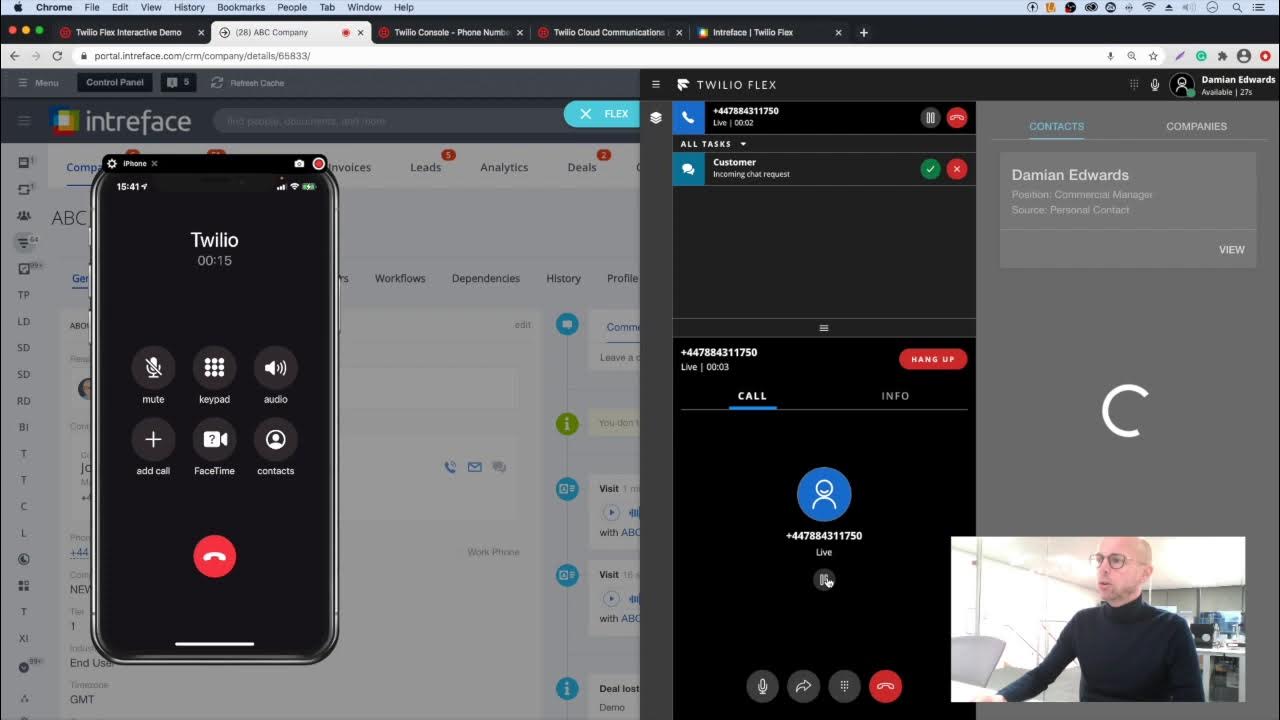
Twilio Flex is a programmable, cloud-based contact center platform that lets you build a modern, omnichannel customer support hub tailored to your workflows instead of forcing you into a rigid, out-of-the-box solution. In this guided Twilio Flex demo tour, you’ll see exactly how Flex works, which features matter most for real-world teams, and how to quickly evaluate whether it’s the right fit for your contact center.
What Is Twilio Flex?
Twilio Flex is a digital-first contact center platform that brings voice, SMS, chat, email, and social messaging into a single, programmable workspace for your agents. Instead of separate tools for each channel, Flex unifies them so supervisors and agents can manage every interaction from one place.
Twilio describes Flex as a “digital engagement center” because it combines communications, real-time data, and AI to deliver personalized customer experiences at scale. Organizations can integrate Flex with CRMs, billing, inventory, and other business systems to show agents complete customer context the moment a conversation starts.
Why Run a Twilio Flex Demo?
Before you commit to any contact center solution, a structured demo helps you see how the platform behaves with realistic scenarios like inbound calls, web chat, and escalations. A Twilio Flex demo lets you experience the agent desktop, routing logic, and reporting tools in action, so you can judge usability, flexibility, and performance against your current environment.
During a good demo, you should focus on three areas:
-
How quickly you can configure channels and queues without code.
-
How easily agents can switch between voice, chat, and messaging while keeping context.
-
How deeply Flex can integrate with your CRM or ticketing tools to reduce swivel-chair work.
This structured view makes it much easier to compare Flex with legacy on-prem systems or other cloud contact center platforms.
Core Benefits of Twilio Flex for Modern Contact Centers
Modern contact centers need more than just a dialer; they need a flexible engagement layer that keeps up with customer expectations. Twilio Flex is designed around four key benefits that become very clear when you walk through a guided demo.
Omnichannel customer engagement
Flex supports voice, SMS, chat, email, and social channels in a single interface, allowing your agents to manage multiple conversations simultaneously. Customers can start on one channel and continue on another without losing the thread, which helps reduce friction and improve satisfaction.
Deep customization and programmability
Unlike many fixed “contact center as a service” tools, Flex lets you customize routing, UI components, and workflows using Twilio’s APIs and SDKs. You can tailor the agent desktop, automate tasks, and create custom integrations that match your existing processes instead of rebuilding everything from scratch.
Real-time data and analytics
A Flex demo typically highlights the reporting views and dashboards that give supervisors insight into queue performance, agent productivity, and service levels. With real-time data, managers can adjust staffing, routing rules, and training based on what’s happening in the contact center right now.
Scalability and reliability
Twilio Flex is built on Twilio’s cloud communications infrastructure, which is designed to scale with traffic and maintain consistent performance. That means you can start with a small team and grow to enterprise-level volumes without re-platforming.
Inside the Twilio Flex Demo: A Complete Guided Tour
In this section, we’ll walk through a complete Twilio Flex demo flow so you know what to expect and what to evaluate at each step. You can use this as a checklist when you schedule your own demo or when you explore an interactive trial.
1. Getting access to a Flex demo
Twilio offers interactive demos and quickstarts that let you see the Flex interface, sample workflows, and reporting views with minimal setup. You can typically fill out a simple form to access a guided, preconfigured environment that showcases the core capabilities.
For a hands-on experience, Twilio’s Flex quickstarts show you how to spin up a Twilio-hosted instance and get comfortable with the agent dashboard and conversations in a short amount of time. This is ideal if you want to test-drive the product internally before talking to sales.
2. Exploring the agent desktop
Once inside the demo, start with the Flex agent desktop, which is the primary workspace where your team will spend most of their day. Here, you should see:
-
A unified inbox for voice calls, chats, SMS, and other channels.
-
Customer details and contact history pulled in from connected systems.
-
Controls to accept, hold, transfer, or conference interactions without leaving the screen.
Pay attention to how intuitive the interface is for first-time users, because agent adoption is critical for any successful contact center rollout.
3. Testing routing and queues
A powerful Twilio Flex demo will also show how tasks (like calls and chats) get routed to the right agents using skills-based routing and queues. Twilio Flex uses TaskRouter and Twilio Studio to configure routing logic, such as assigning high-value customers to specialized teams or prioritizing VIP queues.
In the demo, ask to see:
-
How to create queues for different products or languages.
-
How to assign skills (for example, “billing” or “tier 2 support”) to agents.
-
How overflow routing is handled when queues get too long.
This will show you how much control you have over service levels and how easily you can adapt as your business evolves.
4. Walking through an omnichannel customer journey
A complete Twilio Flex demo should simulate a real customer journey, such as a user starting with a website chat, then switching to a phone call for escalation. The goal is to see whether the agent retains context, notes, and history as the interaction moves between channels.
Look for:
-
Persistent customer profiles and context across channels.
-
Automatic linking of chat transcripts, call recordings, and tickets in one timeline.
-
Smooth handoffs between agents or departments with minimal friction.
If the demo clearly surfaces this continuity, it’s a strong indication that Flex can help you deliver more personalized and efficient customer experiences.
5. Reviewing supervisor tools and reporting
Supervisors need visibility into live queues, agent status, and historical trends, and a Twilio Flex demo should include the supervisor view. In this part of the tour, expect to see:
-
Real-time dashboards for monitoring concurrent conversations and wait times.
-
Reporting on handle times, occupancy, and service-level metrics.
-
Tools for whisper coaching, barging into calls, or assigning tasks manually in special cases.
This is where you can judge whether Flex will make your team easier to manage and optimize over time.
6. Evaluating integrations and customization
A key reason teams choose Flex is the ability to integrate deeply with existing systems such as CRMs, ticketing tools, and internal databases. During the demo, ask how Flex connects with tools like Salesforce, Zendesk, or homegrown systems via APIs and webhooks.
You should see examples of:
-
Custom fields and widgets embedded inside the Flex UI.
-
Automated updates to CRM records when calls or chats end.
-
Triggers that fire workflows in external systems based on contact center events.
If your use case is complex, the level of integration flexibility you witness in the demo will be a decisive factor.
Step-by-Step: Spinning Up a Basic Twilio Flex Environment
If you want to go a bit beyond a passive demo, Twilio’s quickstarts make it possible to stand up a basic Flex contact center in roughly 30 minutes. This isn’t a full production deployment, but it’s enough to validate the core experience with your own agents.
Here’s the high-level flow:
-
Create your Twilio Flex account
-
Sign up for Twilio and select Flex during account setup.
-
Configure billing and invite other admins who will help manage the instance.
-
-
Run through the Flex initialization
-
After verification, Twilio automatically provisions your Flex contact center and redirects you to the new dashboard.
-
You get a cloud-hosted instance that is ready for configuration and basic testing.
-
-
Configure communication channels
-
Use the checklist to add channels like voice, chat, and SMS.
-
Set up phone numbers, chat widgets, and connection settings so customers can reach you.
-
-
Set up routing and onboarding
-
Define queues and skills-based routing rules using TaskRouter and Twilio Studio.
-
Onboard agents and supervisors, assign roles, and provide login credentials.
-
-
Enable reporting and integrations
-
Turn on analytics views and confirm that data is flowing correctly.
-
Connect Flex to CRM or ticketing systems to streamline workflows.
-
By following this path, you can move from purely theoretical evaluation to live test calls and chats in a short amount of time, which helps you make a confident procurement decision.
Twilio Flex Features That Stand Out in a Demo
Certain capabilities are especially important when you’re evaluating a modern contact center platform like Flex. Use your demo to dig into these areas and see how they compare to your current system.
Customizable agent experience
Flex lets you customize nearly every part of the agent and supervisor experience, from the layout of panels to the actions available on each interaction. This helps match the UI to your team’s workflows so agents stay focused and efficient.
AI and automation
Twilio Flex can incorporate bots and artificial intelligence to automate routine tasks like FAQs, routing, and post-call summarization. In a demo, you can ask how AI is used for conversation assistance, intent detection, or proactive outreach, and how those features fit into your compliance requirements.
Real-time analytics and dashboards
Real-time analytics provide an always-on view of your contact center’s health, from queue lengths to agent occupancy. Good demos will show how easily you can configure reports and how supervisors can use this data for staffing and training decisions.
Comparing Twilio Flex to Traditional Systems
To make your demo actionable, it helps to compare what you’re seeing in Flex to what you have today. The table below outlines common differences that typically emerge.
| Aspect | Traditional on-prem contact center | Twilio Flex cloud contact center |
|---|---|---|
| Deployment | Hardware-heavy, long rollout cycles. | Cloud-hosted, quick setup with online quickstarts and checklists. |
| Channels | Often voice-centric, limited digital options. | Omnichannel across voice, SMS, chat, email, social in one UI. |
| Customization | Vendor-led, slow and expensive changes. | Highly programmable via APIs, SDKs, and Studio flows. |
| Integrations | Point-to-point, hard to maintain. | Designed to integrate with CRM, billing, and other tools. |
| Analytics | Batch reports, limited real time. | Real-time dashboards with historical reporting built in. |
| Scalability | Capacity constrained by hardware. | Scales elastically with cloud infrastructure. |
Using this comparison during or after your demo will give you a clear business case and help stakeholders understand why a move to Flex might be worthwhile.
More Article: Can HubSpot Replace Mailchimp for SMEs Looking Beyond Basic Email Marketing?
How to Get the Most from Your Twilio Flex Demo
To turn a standard Twilio Flex demo into a true evaluation, go in prepared with a small list of scenarios and questions that mirror your real world. For example, you might ask the solutions engineer to simulate a high-volume burst on a single queue or to show how agents handle simultaneous chats and calls.
Some focused questions you can bring to the session:
-
How would you migrate our current phone numbers and IVR flows into Flex?
-
Can we replicate our existing SLA reporting and add new metrics without custom development?
-
How does Flex handle compliance requirements for call recording, data residency, and retention policies in our industry?
The more closely the demo aligns with your real workflows, the easier it will be to see Twilio Flex as the backbone of your next-generation contact center.
For an in-depth technical overview, architecture diagrams, and official quickstart guides, you can explore the Twilio Flex documentation and quickstart section directly on Twilio’s site